
How to create Movie Card | HTML & CSS Project - Frontend everything

Hello Everyone 👋 Welcome to My New Blog. Today I have made an Amazing Movie Card with the help of HTML and CSS Only! 😍
I am Piyush, Sharing About Web development Daily. You can also check out me at @frontendeverything.
Before starting the blog, you might think about where you can use this project in real-life-based projects. So it's an Amazing Movie Card that you can use in your own blog project. So it will look attractive.
Let's start making these amazing Movie Card Using HTML & CSS step by step.
Video of the project,
So that was the preview now let us start making the project 😄 First, we will code HTML then CSS, and also I have shared codepen ink to make it easier for you.
HTML 🎈( step - 1)
In HTML we have used divs for containers.
 <body>
      <div class="hero-container">
           <div class="main-container">
                <div class="poster-container">
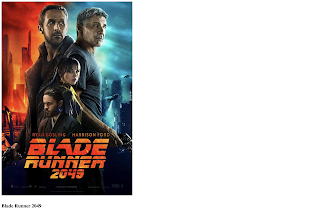
                     <a href="#"><img src="https://i.ibb.co/ThPNnzM/blade-runner.jpg" class="poster" /></a>
                </div>
                <div class="ticket-container">
                     <div class="ticket__content">
                          <h4 class="ticket__movie-title">Blade Runner 2049</h4>
                          <p class="ticket__movie-slogan">
                               More human than human is our motto.
                          </p>
                          <p class="ticket__current-price">$28.00</p>
                          <p class="ticket__old-price">$44.99</p>
                          <button class="ticket__buy-btn">Buy now</button>
                     </div>
                </div>
           </div>
           <div class="main-container">
                <div class="poster-container">
                     <a href="#"><img src="https://i.ibb.co/Zd51z5c/justice-league.jpg" class="poster" /></a>
                </div>
                <div class="ticket-container">
                     <div class="ticket__content">
                          <h4 class="ticket__movie-title">Justice League</h4>
                          <p class="ticket__movie-slogan">You can't save the world alone.</p>
                          <p class="ticket__current-price">$20.75</p>
                          <p class="ticket__old-price">$40.99</p>
                          <button class="ticket__buy-btn">Buy now</button>
                     </div>
                </div>
           </div>
      </div>
 </body>
After the HTML we will design the Product Card with CSS..
Output till now
CSS🎈( step - 2)
 @import url("https://fonts.googleapis.com/css2?family=Roboto:wght@100;300;400;500;700&display=swap");
 * {
      box-sizing: border-box;
      padding: 0;
      margin: 0;
 }
 body {
      background: #457fb4;
      font-family: "Roboto", sans-serif;
      display: flex;
      height: 100vh;
 }
 .hero-container {
      margin: auto;
      display: flex;
 }
 .main-container {
      width: 270px;
      height: 540px;
      position: relative;
      margin: 0 20px;
 }
 .poster-container {
      width: 230px;
      position: absolute;
      top: 0;
      left: 20px;
      z-index: 9999;
 }
 .poster {
      width: 100%;
      box-shadow: 0 5px 20px 3px rgba(0, 0, 0, 0.6);
 }
 .ticket-container {
      background: #fff;
      width: 270px;
      height: 520px;
      display: flex;
      flex-direction: column;
      align-items: center;
      border-radius: 5px;
      position: absolute;
      top: 20px;
      box-shadow: 0 5px 20px 3px rgba(0, 0, 0, 0.6);
      opacity: 0;
 }
 .main-container:hover .ticket-container {
      opacity: 1;
      animation: bounceIn 0.6s linear;
 }
 @keyframes bounceIn {
      0%,
      20%,
      40%,
      60%,
      80%,
      to {
           -webkit-animation-timing-function: cubic-bezier(0.215, 0.61, 0.355, 1);
           animation-timing-function: cubic-bezier(0.215, 0.61, 0.355, 1);
      }
      0% {
           opacity: 0;
           -webkit-transform: scale3d(0.3, 0.3, 0.3);
           transform: scale3d(0.3, 0.3, 0.3);
      }
      20% {
           -webkit-transform: scale3d(1.03, 1.03, 1.03);
           transform: scale3d(1.03, 1.03, 1.03);
      }
      40% {
           -webkit-transform: scale3d(0.9, 0.9, 0.9);
           transform: scale3d(0.9, 0.9, 0.9);
      }
      60% {
           opacity: 1;
           -webkit-transform: scale3d(1.01, 1.01, 1.01);
           transform: scale3d(1.01, 1.01, 1.01);
      }
      80% {
           -webkit-transform: scale3d(0.97, 0.97, 0.97);
           transform: scale3d(0.97, 0.97, 0.97);
      }
      to {
           opacity: 1;
           -webkit-transform: scaleX(1);
           transform: scaleX(1);
      }
 }
 /* @keyframes bounce {
  50% {
   opacity: 1;
   transform: scale(1.1);
  }
  100% {
   opacity: 1;
   transform: scale(1);
  }
 } */
 .ticket__content {
      width: 100%;
      position: absolute;
      bottom: 0;
      text-align: center;
 }
 .ticket__movie-title {
      text-transform: uppercase;
      margin-bottom: 5px;
 }
 .ticket__movie-slogan {
      color: #999;
      font-size: 0.9rem;
      margin-bottom: 20px;
 }
 .ticket__current-price {
      color: #69c982;
      font-size: 1.4rem;
      font-weight: bold;
 }
 .ticket__old-price {
      color: #999;
      text-decoration: line-through;
      margin-bottom: 10px;
 }
 .ticket__buy-btn {
      cursor: pointer;
      width: 100%;
      background: #2f2f2f;
      color: white;
      padding: 15px 0;
      font-size: 1rem;
      font-weight: bold;
      text-transform: uppercase;
      border: 0;
      border-bottom-left-radius: 5px;
      border-bottom-right-radius: 5px;
 }
Now we have done the CSS coding as well, now we will see the final output and also check the codepen link mentioned below.
Final Output
The codepen link is here for making your work easier!
.
If you found any value in this blog you can support me by buying me a coffee.
.
.
.
.
.
Thank You For Scrolling Till here 😊. If You gain any knowledge then do checkout me at @frontendeverything. I am Piyush 🎉 I provide Content related to programming, technology, web development Daily.
.